I have setup a hosted site using a mySQl database to store Temperature and Humidity results sent from an ESP32/DHT11. This data is then visualized in a webpage utilizing chart.js to plot the data using a simple line graph.
In future, I would like to expand the data collected and have added a few extra fields into the database.
I have not addressed security in connecting to the site. The ESP32 connects to the end point with no authentication.
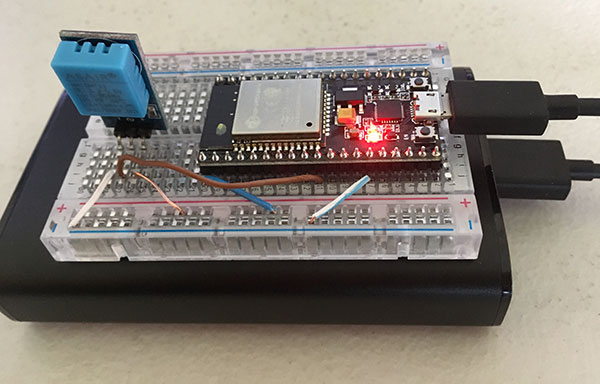
Board setup
Website Pages
upload.php – endpoint for data upload
config.php – Stores database config information
chart.php – Display temperature and humidity data using Chart.js
Database:
Table Fields:
id – Medium int.
logdate – Datetime
temperature – float
humidity – float
pressure – float
light – float
Webserver PHP code:
config.php
	define('DB_SERVER', 'localhost');
	define('DB_USER', '--- YOUR DB USERNAME--');
	define('DB_PASSWORD', '--YOUR DB PASSWORD --');
	define('DB_NAME', '--Name of your database--');
	define('TB_ENV', '--Name of table storing the data --');
upload.php
include('config.php');
    $conn =  mysqli_connect(DB_SERVER, DB_USER, DB_PASSWORD,DB_NAME) or die("Unable to connect to MySQL");
    //0: temperature
    //1: humidity
    //2: pressure
    //3: light

    if (mysqli_real_escape_string($conn,$_POST['temperature']) ==NULL ||mysqli_real_escape_string($conn,$_POST['temperature']) ==NAN){
        $temperature="NULL";
    }else{
        $temperature=mysqli_real_escape_string($conn,$_POST['temperature']);
    }
    if (mysqli_real_escape_string($conn,$_POST['humidity']) ==NULL){
        $humidity="NULL";
    }else{
        $humidity=mysqli_real_escape_string($conn,$_POST['humidity']);
    }
    if (mysqli_real_escape_string($conn,$_POST['pressure']) ==NULL){
        $pressure="NULL";
    }else{
        $pressure=mysqli_real_escape_string($conn,$_POST['pressure']);
    }
    if (mysqli_real_escape_string($conn,$_POST['light']) ==NULL){
        $light="NULL";
    }else{
        $light=mysqli_real_escape_string($conn,$_POST['light']);
    }
    $logdate= date("Y-m-d H:i:s");

    $insertSQL="INSERT into ".TB_ENV." (logdate,temperature,humidity,pressure,light) values ('".$logdate."',".$temperature.",".$humidity.",".$pressure.",".$light.")";
    mysqli_query($conn,$insertSQL) or die("INSERT Query has Failed - ".$insertSQL );

?>
Chart.php
chart.js
<!doctype html>
<html>
<head>
    <meta http-equiv="refresh" content="60">
    <title>Temp/Humidity</title>
    <script src="Chart.bundle.min.js"></script>

</head>
<body>

<form method=""GET" action="chart.php">
Start: <input type="datetime-local" name="begindate" id="begindate" />
End: <input type="datetime-local" name="enddate" id="enddate" />
<input type="submit" />
</form>


<br/>
<<anvas id="temperature" style="width:100%; height:400px;">
<script>
    var ctx = document.getElementById("temperature");
    var config = {
        type: 'line',

        data: {
            labels:,
            datasets:[{
                label:'Temperature',
                fill:false,
                borderColor:'rgba(154,21,7,1)',
                data:,

            }]
        },
        options: {
            responsive:false,
            title:{
                display:true,
                text:'Temperature',
            },
            scales: {
                xAxes: [{
                    display:true,
                }]
            }
        }
    };


        window.temperatureChart = new Chart(ctx, config);
</script>
<canvas id="humidity" style="width:100%; height:400px;"></canvas>
<script>
    var ctx = document.getElementById("humidity");
    var config = {
        type: 'line',
        data: {
            labels:,
            datasets:[{
                label:'Humidity',
                fill:false,
                borderColor:'rgba(7,42,154,1)',
                data:,

            }]
        },
        options: {
            responsive:false,
            title:{
                display:true,
                text:'Humidity',
            }
        }
    };


    window.humidityChart = new Chart(ctx, config);
</script>

</body>
</html>
ESP32 Code – using Arduino IDE V1.8.5
instruction for installing Arduino core for ESP32 WiFi chip
ESP32-temp-humid.ino
#include#include "DHT.h" #include #define DHTTYPE DHT11 // DHT 11 #define DHTPIN 26 #define RETRY_LIMIT 20 DHT dht(DHTPIN, DHTTYPE); const char* ssid = "-- YOUR LOCAL WIFI SSID--"; const char* password = "-- YOUR LOCAL WIFI PASSWORD--"; void setup() { dht.begin(); Serial.begin(115200); WiFi.begin(ssid,password); while (WiFi.status()!= WL_CONNECTED){ delay(500); Serial.print("."); } Serial.println(""); Serial.println("WiFi connected"); Serial.println("IP Address"); Serial.println(WiFi.localIP()); } void loop() { int rtl = RETRY_LIMIT; float h = dht.readHumidity(); float t= dht.readTemperature(); delay(500); while (isnan(t) || isnan(h)){ Serial.println("Check sensor again - " + rtl); h = dht.readHumidity(); t= dht.readTemperature(); delay(500); if (--rtl <1){ ESP.restart(); // At times the DHT11 just kept returning NAN. A Restart fixed this. } } //Open a connection to the server HTTPClient http; http.begin("http://--YOUR WEBSITE URL HERE --/upload.php"); http.addHeader("Content-Type", "application/x-www-form-urlencoded"); //format your POST request. int httpResponseCode = http.POST("temperature=" + String(t) +"&humidity=" + String(h)); if (httpResponseCode >0){ //check for a return code - This is more for debugging. String response = http.getString(); Serial.println(httpResponseCode); Serial.println(response); } else{ Serial.print("Error on sending post"); Serial.println(httpResponseCode); } //closde the HTTP request. http.end(); //Monitor values in console for debugging. Serial.println("Temp = " + String(t)); Serial.println("humidity = " + String(h)); //wait 2 minutes for next reading delay(120000); }